
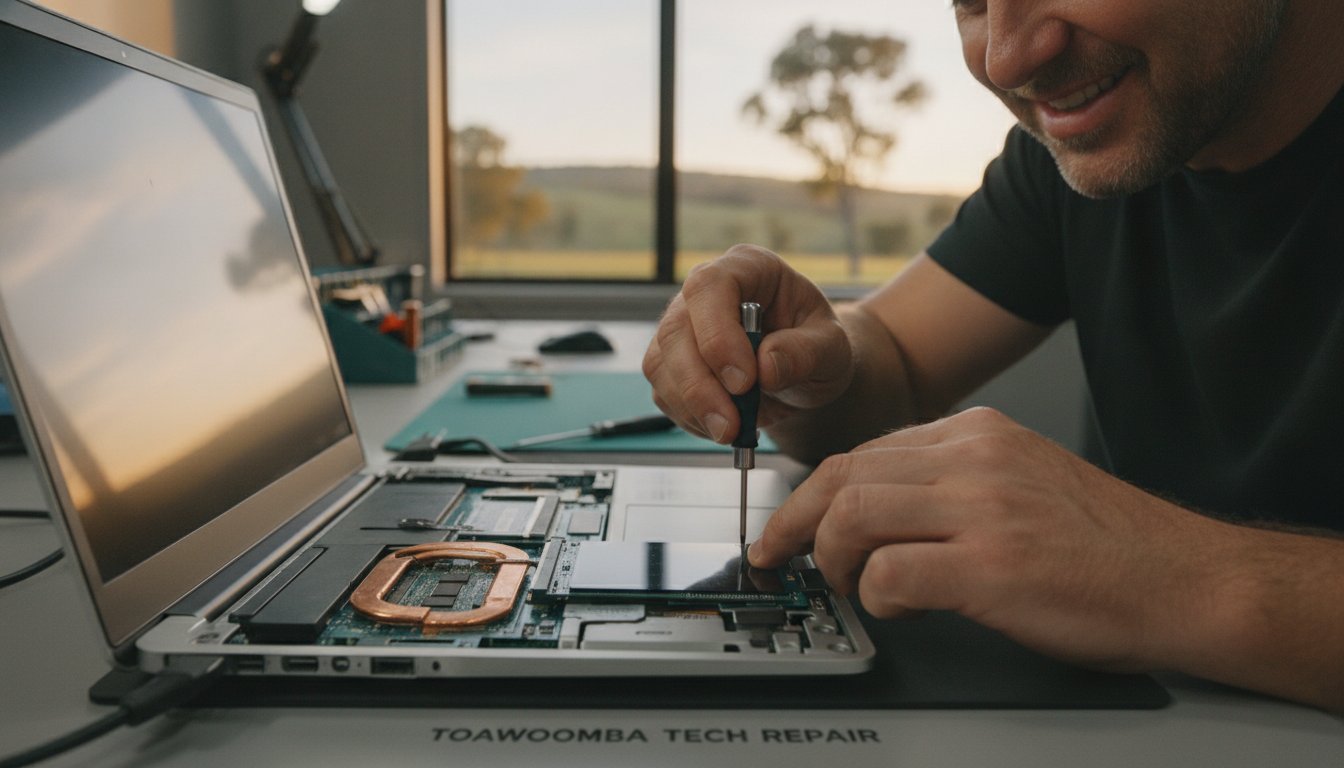
Dropping A$1,500 on a brand-new laptop in 2026 might actually be the most expensive mistake you make this year. With hardware prices from major vendors like Dell and HP climbing by up to 20% in the second half of 2026 due to AI-driven component shortages, buying new isn’t always the smartest move. If you are searching for slow computer repair Toowoomba, you’ve likely realized that your current machine just isn’t keeping up with your daily workload anymore.
It’s incredibly draining to start your morning staring at a loading circle while your productivity slips away. You shouldn’t have to worry about the high cost of a replacement or the anxiety of losing your precious data during a fix. At Aspire Computing, I’ve spent over 25 years helping locals transform frustratingly sluggish devices into snappy, responsive tools. This guide will show you how strategic hardware upgrades, like SSD installations and RAM boosts, offer a sustainable and cost-effective alternative to the “replace everything” cycle. You’ll learn exactly which components will give you the biggest performance jump so you can get back to work without the lag.
Key Takeaways
- Identify how modern software demands create hardware bottlenecks that throttle your system’s daily performance.
- Discover how professional slow computer repair Toowoomba can breathe new life into older machines through targeted SSD and RAM upgrades.
- Apply the “50% Rule” to determine if a strategic hardware repair is a smarter financial choice than purchasing a new A$1,500 laptop.
- Learn the essential steps for a smooth repair process, including how to secure your data and document specific lagging symptoms.
- Leverage over 25 years of local expertise to find sustainable, eco-friendly hardware solutions that avoid unnecessary e-waste.
Why is My Computer So Slow? Understanding Technical Bottlenecks
It is a common frustration for many residents in the Darling Downs. You turn on your PC, expect to get straight to work, but instead, you are greeted by a spinning circle and a system that feels like it is wading through treacle. When looking for slow computer repair Toowoomba, it’s helpful to start by understanding computer performance and the concept of a hardware bottleneck. This happens when one aging component, like a mechanical hard drive, prevents your high-speed processor from working at its full potential. Even a high-end CPU will feel sluggish if it is constantly waiting for data from a slow storage drive.
By 2026, the software we use daily has become significantly more demanding. Applications like Microsoft Teams, Google Chrome, and Zoom now consume vast amounts of memory and processing power to handle AI-integrated features and complex background tasks. If your hardware hasn’t been updated recently, these modern apps will quickly overwhelm your system. Local conditions also play a role; the dust and heat common in Toowoomba can lead to thermal throttling. This is where your computer intentionally slows down its own processor to prevent physical damage from overheating.
To better understand this concept, watch this helpful video:
Software vs. Hardware: When a Clean-up Isn’t Enough
Sometimes, a simple Windows tune-up or virus removal is all you need to clear out digital clutter. If your PC only slows down when you open a specific program, it might be a software glitch. However, if you are seeing “Not Enough Memory” warnings or your system freezes during basic multitasking, you are likely facing a physical hardware limitation. When you seek professional slow computer repair Toowoomba, an expert can help you see that while software maintenance provides a temporary boost, only a physical hardware upgrade offers a permanent solution to a system outpaced by modern requirements.
The Impact of Aging Components on Daily Productivity
For a small business owner, a lagging computer is more than just an annoyance; it is a direct drain on your bottom line. Waiting just five minutes for your PC to boot and settle every morning adds up to nearly 20 hours of lost productivity over a year. The psychological toll of constant delays often leads to unnecessary tech-anxiety and frustration. In 2026, 8GB of RAM is no longer the standard for professional multitasking. Upgrading to 16GB or more ensures your machine feels snappy, allowing you to focus on your work rather than your hardware. If you need a hand assessing your system, Aspire Computing provides the local expertise to identify these productivity killers.
The Big Three: Hardware Upgrades That Actually Fix Slowness
Many people try software cleaning first, often following Microsoft’s official performance tips, but they often find the results are only temporary. For a permanent solution, we have to look at the physical components. This is the core of effective slow computer repair Toowoomba. Most performance issues stem from three key areas: storage, memory, and the processor. By addressing these physical bottlenecks, you can often double the usable life of your current machine.
SSD Upgrades: Replacing the “Spinning” Hard Drive
Traditional Hard Disk Drives (HDDs) use a physical arm to read data from a spinning platter. This mechanical process is the slowest part of any modern computer. Modern Solid State Drives (SSDs), especially NVMe versions, use flash memory with no moving parts. This upgrade can slash your boot times from two minutes down to less than twenty seconds. For mobile workers in the Darling Downs, SSDs also offer better durability. Because there are no moving parts, a small bump to your laptop won’t result in a catastrophic head crash or data loss. Transitioning to an SSD is the single most impactful repair you can perform on a computer older than three years.
RAM: The Secret to Smooth Multitasking
RAM is your computer’s short-term workspace. If you find your browser tabs crashing or your system lagging when switching between Outlook and Excel, you likely need more memory. While 8GB was once enough, 16GB or 32GB has become the new sweet spot for Toowoomba home offices in 2026. Modern apps like Microsoft Teams and high-resolution video calls quickly consume smaller memory pools, forcing the computer to use slower virtual memory. Before buying parts, it’s vital to check if your laptop has “slotted” memory that can be swapped, or “soldered” memory which is permanently attached to the motherboard. You can find more detail on this in our PC Hardware Upgrades: A Complete Guide to a Faster Computer.
The CPU is the brain of your PC. While desktop processors can often be swapped for faster models, laptop CPUs are almost always permanently attached to the motherboard. If your processor is the bottleneck, an upgrade might involve a more complex component swap or a new motherboard. We always provide an honest assessment of whether an upgrade is possible or if it’s time for a different machine. If you’re unsure which path to take, getting a professional hardware assessment is the best way to avoid wasting money on the wrong parts. Choosing the right upgrade for slow computer repair Toowoomba ensures your machine stays productive for years to come.
Upgrade vs. Replace: Is Your Slow PC Worth Saving?
Deciding whether to invest in slow computer repair Toowoomba or buy a new machine is a common dilemma for many locals. Many people assume a lagging computer is “dead,” but often it just needs a specific component refreshed. We use the “50% Rule” to guide our customers. If the cost of the repair or upgrade exceeds 50% of the price of a comparable new machine, replacement might be the better financial path. In 2026, with new laptop prices rising by up to 20% due to global chip demands, that 50% threshold often makes a targeted upgrade the more attractive option.
Don’t forget the hidden costs of buying new. A A$1,200 laptop isn’t just A$1,200. You have to factor in data migration, re-installing specialised software, and the hours spent setting up your digital environment. For many small business owners in the Darling Downs, this “downtime cost” can add hundreds of dollars to the actual price of a new machine. Choosing to upgrade is also a win for our local environment. By extending the life of your hardware, you reduce e-waste and the carbon footprint associated with manufacturing new electronics. You can read more about this decision in our article on Is Repairing Your Computer Worth It?
When Upgrading is the Superior Financial Choice
High-quality, business-grade machines like Dell Latitudes or HP EliteBooks are built with durable chassis and premium cooling systems. These are excellent candidates for a refresh. If you have legacy software that is difficult to move to a fresh Windows 11 setup, a A$250 SSD and RAM boost is often far more efficient than a A$600 “budget” laptop. Those cheaper new models often feature low-end processors that will likely feel slow within twelve months anyway. A repaired premium machine will almost always outperform a brand-new budget one.
When it is Time to Retire Your Old Machine
There are times when slow computer repair Toowoomba isn’t the right answer. If your system lacks modern security hardware like TPM 2.0, it won’t be able to run the latest operating systems safely. Physical damage to the screen or a cracked chassis can also make repairs unfeasible if replacement parts are no longer manufactured. Generally, if your computer is over 7 or 8 years old, the motherboard architecture itself becomes a bottleneck that even a new SSD cannot fully overcome. In these cases, we’ll always provide an honest recommendation to help you find a reliable replacement.

Preparing for Your Repair: A Step-by-Step Checklist
Organising slow computer repair Toowoomba is the first step toward a more productive day, but a small amount of preparation ensures the process is stress-free. Before a technician arrives at your home or office, or before you drop your machine off, taking these steps protects your information and helps us work more efficiently. Your data is your most valuable asset, so ensuring it is safe remains our top priority. A little groundwork now prevents headaches later.
- Back up your data: Even though hardware upgrades are generally safe, it’s essential to have a fresh backup on an external drive or a cloud service like OneDrive or Google Drive.
- Document your symptoms: Note exactly when the slowness occurs. Does it happen right at boot-up, or only after you’ve opened ten tabs in Chrome?
- Check your warranty: If your computer is less than two years old, check if a third-party upgrade might affect your manufacturer’s warranty. Remember that Australian Consumer Law often provides protections regardless of brand policies.
- Clear your workspace: If you’ve booked an on-site visit in the Darling Downs, having a clean, well-lit desk ready allows the technician to get straight to work.
The Risks of DIY Hardware Upgrades
It’s tempting to try a DIY fix after watching a quick video online. However, modern computers are incredibly sensitive. Static electricity, or Electrostatic Discharge (ESD), can “fry” a motherboard or RAM stick before you even turn the power on. You won’t see a spark, but the damage is permanent. Modern “thin and light” laptops are also notoriously difficult to open. They often use hidden plastic clips and fragile ribbons that are easily snapped if you don’t have the specific pry tools and experience. Often, installing new parts also requires a BIOS update to ensure the motherboard recognises the new hardware, which can be a risky process for the uninitiated.
Why Professional Installation is Safer
Choosing professional slow computer repair Toowoomba means your machine is handled with expert care. We don’t just “plug and play.” We focus on internal cable management and ensuring optimal airflow, which is vital given the dust and heat we experience in Toowoomba. After the physical installation, we perform professional stress-testing to confirm the new components are stable under load. This methodical approach gives you the peace of mind that comes with guaranteed workmanship. If you’re ready to stop the lag and start working faster, book your professional hardware upgrade today and let a local expert handle the heavy lifting.
Local Slow Computer Repair in Toowoomba: The Aspire Advantage
Aspire Computing has been a Toowoomba staple since 1999. This long-standing history means I’ve seen every type of technical failure and system slow-down imaginable over the last 25 years. When you search for slow computer repair Toowoomba, you aren’t just looking for a quick fix; you’re looking for someone who understands your specific setup and needs. Unlike larger franchises where you might deal with a rotating door of junior staff or an anonymous call centre, I provide a personalised, owner-operated service. You speak directly to the expert who will be working on your machine. This direct accountability builds the trust necessary for a long-term professional relationship.
My focus is on providing utility and security for home offices and small businesses. I understand that your computer is your livelihood. A system that lags or crashes isn’t just a nuisance; it’s a threat to your business continuity. By offering on-site convenience, I save you the trouble of disconnecting cables and lugging heavy hardware across town. Whether you’re located in Newtown, Wilsonton, or Middle Ridge, I bring the expertise to your door. This approach allows me to see your computer in its natural environment, often identifying local issues like poor ventilation or peripheral interference that a workshop repair might miss.
Serving the Darling Downs and Lockyer Valley
My service area extends well beyond the city centre. I regularly support clients in Highfields, Glenvale, and throughout the wider Lockyer Valley. With the rise of remote work, more people than ever rely on high-performing home offices to stay competitive. I provide rapid on-site responses to ensure these remote workers stay connected and productive without long periods of downtime. If you aren’t sure where your system’s bottleneck is, a professional assessment is the best place to start. You can Contact Aspire Computing for a Free IT Health Check to get a clear picture of your system’s current state and security.
Ready to Get Your Speed Back?
Choosing a professional hardware upgrade is a smart, sustainable way to reclaim your productivity without the massive price tag of a new 2026-model laptop. We have explored the benefits of SSDs, the necessity of modern RAM, and the financial logic of repairing over replacing. Now, it’s time to act. Booking an on-site consultation is the fastest way to stop the daily frustration of a lagging PC. I’m here to provide the reassuring and professional local support you need to get your machine running like new again. Don’t let a slow computer hold you back when a simple, expert intervention is just a phone call away.
Reclaim Your Productivity and Peace of Mind
A lagging PC doesn’t have to be the end of your machine’s useful life. We have explored how targeted upgrades like SSDs and RAM boosts can often double the speed of an older system for a fraction of the cost of a new A$1,500 laptop. By applying the 50% rule and preparing your data properly, you can make an informed choice that is both financially smart and environmentally sustainable. When you are ready for professional slow computer repair Toowoomba, you deserve a technician who understands the local landscape and your specific technical needs.
Since 1999, I’ve been helping residents and small businesses across the Darling Downs stay connected with reliable, owner-operated service. Whether you need on-site help in Highfields or remote assistance from your home office, you can count on expert advice that prioritises your security and system utility. Don’t let another morning slip away while you wait for your computer to catch up with your workload. Revive your slow computer today with Aspire Computing and get back to working with a machine that finally keeps pace with you.
Frequently Asked Questions
Is it better to upgrade my RAM or my SSD first for speed?
An SSD upgrade is usually the best first step for a dramatic speed increase. While RAM helps with multitasking, an SSD transforms how quickly Windows boots and how fast programs open. If you’re on a budget, replacing a mechanical hard drive with an SSD offers the best return on investment. Most users notice an immediate, significant difference in responsiveness after this single change.
Can any laptop be upgraded, or are some “locked”?
Not every laptop can be upgraded because some manufacturers solder components directly to the motherboard. This is common in very thin laptops or certain “budget” models where cost-saving measures are used. I can check your specific model to see if it has open slots for RAM or a replaceable storage drive. Knowing your hardware’s limits helps you decide if a repair or a replacement is the better path.
How long does a typical hardware upgrade take in Toowoomba?
Most professional hardware upgrades for slow computer repair Toowoomba are completed within 24 to 48 hours. The actual physical installation is quick, but cloning your data to a new drive takes time to ensure every file is moved safely. I aim for a rapid turnaround so you aren’t without your machine for long. Complex repairs might take more time if specific parts need to be ordered from Australian suppliers.
Will upgrading my hardware delete my files and photos?
Your files and photos are not deleted during a professional hardware upgrade. When I install a new SSD, I use specialised software to “clone” your old drive onto the new one. This means your desktop, icons, and personal files stay exactly where you left them. I always recommend a fresh backup before any work begins just to be completely safe with your data.
Can a hardware upgrade help with slow NBN internet speeds?
A hardware upgrade won’t increase the raw speed of your NBN connection, but it will make your computer handle web content much faster. Modern websites are heavy and require significant processing power to load. If your PC is slow, even a fast internet connection will feel sluggish. Upgrading your RAM or processor helps your browser render pages and stream video without the frustrating lag.
How do I know if my slow computer has a virus or needs new parts?
Identifying the difference between a virus and a hardware issue requires a methodical diagnostic. Viruses typically cause specific symptoms like unexpected pop-up windows, changed browser settings, or files that won’t open. Hardware bottlenecks usually cause a general, consistent slow-down across every task you perform. I can run a full system scan and hardware health check to identify the true culprit behind your computer’s performance issues.
Is it worth upgrading a computer that is 5 years old?
Upgrading a 5-year-old computer is often a very smart financial move. Most machines from that era still have capable processors but are held back by slow mechanical hard drives or limited RAM. By investing a small amount in new parts, you can often get another three to four years of productive life out of the machine. This is a much cheaper alternative than buying a brand-new laptop for A$1,500.
Do you provide on-site computer repair in Highfields and Westbrook?
I provide convenient on-site slow computer repair Toowoomba to Highfields, Westbrook, and all surrounding suburbs. You don’t have to worry about packing up your desktop or finding a parking spot in town. I come directly to your home or office to assess the system in its usual environment. This allows me to check your local network and peripherals while I’m there to ensure everything is working perfectly.

B.App.Sc., Cert. Computer Engineering PC Service and Repair
As the owner of Aspire Computing founded in 1999, Chaim Lee has been working for over 20 years as the Leading Computer Technician.
He has a life long interest in electronics, computing, science and technology. He has completed studies and gained qualifications in Applied Science, Computer Repair and Service, Microsoft Installation and Maintenance, Technical Writing, Workplace Training, and Technical Sales Training.

Write a Comment