
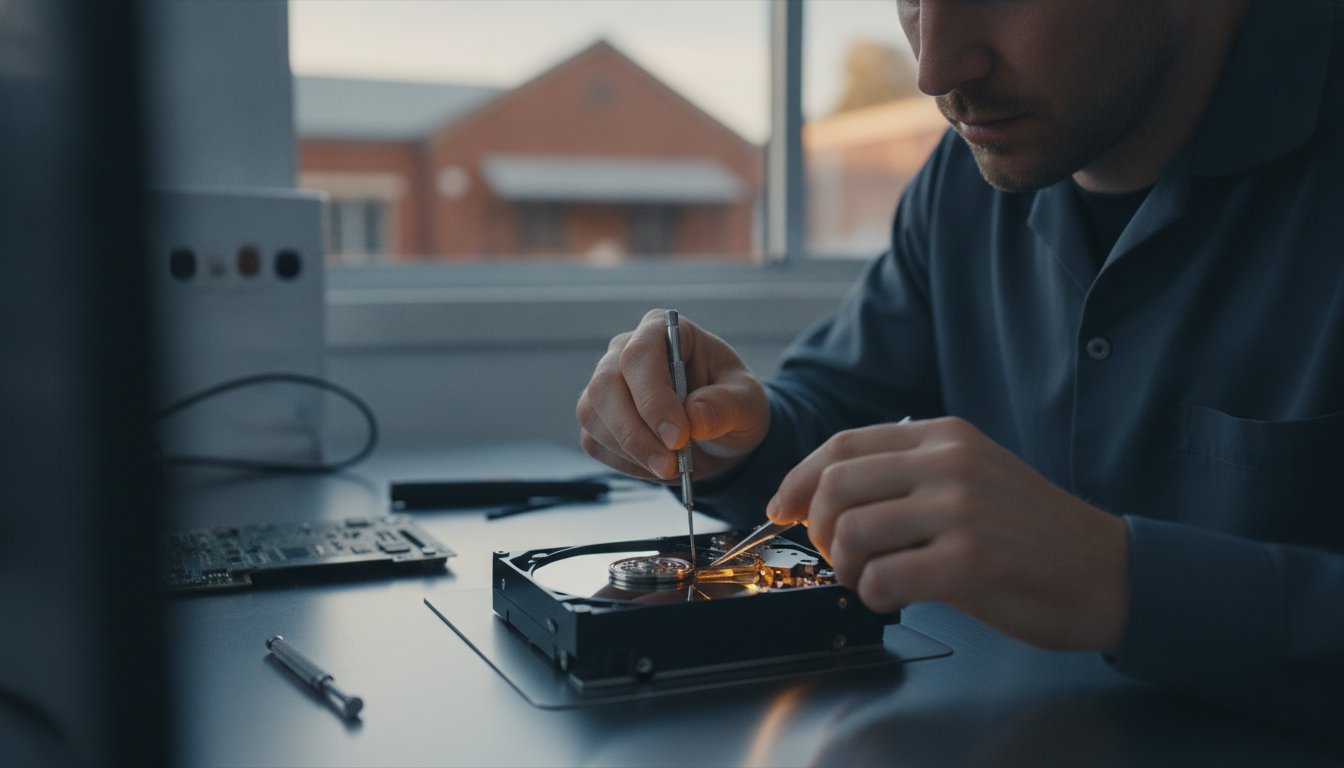
Imagine opening your laptop to find years of family photos or critical business accounts have simply vanished. If you’re facing a clicking drive or a “device not found” error, you need reliable laptop data recovery Toowoomba services before a small glitch becomes a permanent loss.
We understand the immediate anxiety of losing your files and the confusion over whether to try a DIY fix or call in a professional. It’s frustrating to feel like your data is held hostage by a failing machine. You want your files back safely without the stress of hidden costs or the risk of mailing your device to a distant city. It’s a common worry, but having a local expert you can talk to face-to-face makes a world of difference.
In this article, you’ll discover how professional data recovery works and why local expertise in Toowoomba matters for your privacy and peace of mind. We will outline the exact steps to take when your drive fails and help you understand the recovery process from start to finish. We also explore how to distinguish between simple software glitches and serious hardware failures so you can make an informed decision for your device.
Key Takeaways
- Understand the critical difference between simple logical errors and physical hardware failure to prevent permanent file loss.
- Learn how professional laptop data recovery Toowoomba services use non-destructive diagnostics and drive imaging to safely clone and retrieve your data.
- Discover why powering down your laptop immediately and documenting strange noises like clicking is the most important “first aid” step you can take.
- Identify the hidden risks of using DIY recovery software on failing hardware and when it’s safer to consult a local expert face-to-face.
- Establish a reliable future-proofing strategy using the 3-2-1 backup rule to ensure your business and personal files are always protected.
What Are Data Recovery Services and Why Do You Need Them?
When your laptop screen stays black or you see a flashing question mark, the initial panic is overwhelming. You likely have years of work, family memories, or financial documents stored on that drive. Data recovery is the specialized process of salvaging this information when it becomes inaccessible through normal means. Understanding what data recovery is can help lower your anxiety; in many cases, the files are still physically present on the storage platters or chips, even if your computer can’t find them.
Since 1999, Aspire Computing has provided professional laptop data recovery Toowoomba residents can rely on. From our local workshop in Newtown, we’ve helped countless home users and small businesses across the Darling Downs get their digital lives back on track. We focus on a reassuring, personal approach because we know how much these files matter to you.
To better understand how these files are retrieved from a technical perspective, watch this helpful video:
Logical vs. Physical Failure: Knowing the Difference
The strategy for a successful recovery depends entirely on the type of failure your device has suffered. We categorize these into two main groups: logical and physical. A logical failure occurs when the hardware is healthy, but the data is inaccessible due to accidental deletion, formatting, or file system corruption. It’s essentially a broken map to your files.
Physical failure is more serious. This involves mechanical damage, such as a crashing head in a hard drive or electronic component burnout on a modern SSD. If you hear clicking, grinding, or humming, you’re likely dealing with physical damage. At Aspire Computing, we treat these scenarios with distinct protocols. Physical failures require specialized tools to prevent further platter damage, while logical issues focus on sophisticated software reconstruction of the file directory.
Common Data Loss Scenarios for Toowoomba Laptop Users
Living in the Darling Downs brings specific challenges for electronics. The Toowoomba storm season often results in sudden power surges that can fry a laptop’s motherboard or drive controller. We also see many morning coffee mishaps or accidental liquid spills that happen during busy workdays in home offices. These liquids can quickly corrode delicate internal circuits.
Mechanical failure is another frequent culprit we see for laptop data recovery Toowoomba. Laptops are portable, so they get dropped, bumped in transit, or simply wear out over several years of constant use. Regardless of how it happened, the first rule is to stop using the device immediately. Continuing to power on a failing drive can overwrite the very files you want to save or turn a minor mechanical issue into a total loss.
The Professional Data Recovery Process: How Your Files Are Saved
Our approach to laptop data recovery Toowoomba starts with a strict safety first protocol. We don’t just plug your drive into a standard computer and hope for the best. That common mistake often leads to permanent data loss. Instead, we follow a methodical four step process designed to maximize the chances of a full recovery while protecting the integrity of your original files.
We start with a non-destructive diagnostic. This allows us to identify whether your drive has a burnt-out circuit board or a mechanical head failure without risking any further damage. Once we understand the health of the drive, we move to the imaging phase. We use specialized hardware to create a bit-for-bit clone of your drive. This clone is a perfect digital mirror of your data. By working on the clone rather than your original failing device, we ensure your hardware isn’t stressed any further.
After we have a stable image, we perform a logical reconstruction of the file system. This is where we piece together the directory structure, restoring your folders and files to their original state. Finally, we perform a secure data transfer. Your recovered files are moved to a brand new, reliable storage device. If you’re worried your drive is reaching its end, a professional hardware assessment can save you from a future emergency.
HDD vs. SSD Recovery: Different Tech, Different Challenges
Traditional Hard Disk Drives (HDDs) are mechanical. They contain spinning platters and moving read heads that eventually wear out or fail after a physical shock. Recovering data from these often involves stabilizing the mechanical components. Solid State Drives (SSDs) are different. They use flash memory and complex controllers. SSDs present unique challenges like the TRIM command, which can permanently wipe deleted data quickly. Controller failures in SSDs require deep technical knowledge of firmware. At Aspire Computing, we handle both laptop and desktop drive formats, regardless of the underlying technology.
RAID and Server Recovery for Toowoomba Businesses
RAID systems are common in Toowoomba small businesses, but they often create a false sense of security. Many owners believe RAID is a backup; it isn’t. It’s a system for redundancy. When parity errors occur or multiple drives fail simultaneously, the entire volume can vanish. Recovering these systems requires reconstructing the specific RAID array parameters. We help local businesses navigate these complex failures to get their operations back online. For more advice on keeping your office running smoothly, check out our guide on IT support for business.
Professional Recovery vs. DIY Software: When to Call an Expert
It’s tempting to download a “free” tool the moment you realize your files are missing. Software certainly has its place for simple tasks, like recovering a document you accidentally deleted from a healthy, functioning drive. However, the moment your hardware shows signs of fatigue, these tools often do more harm than good. Running consumer software on a failing drive is like forcing a car with a broken engine to keep driving at 100km/h. It accelerates the mechanical crash and can turn a recoverable situation into a permanent loss.
When you weigh the cost of a professional diagnostic against the value of your irreplaceable wedding photos or critical business tax records, the choice becomes clearer. A local specialist in laptop data recovery Toowoomba provides a safe, controlled environment where your drive isn’t stressed beyond its limits. We use hardware-level imagers that handle read errors far more gracefully than any Windows or Mac software ever could.
Security is another major factor that many users overlook. Many online recovery tools require you to upload data to untrusted cloud servers or grant deep permissions to your system. By choosing a local workshop in the Darling Downs, your sensitive information stays offline and under the personal supervision of a trusted expert. You don’t have to wonder who is looking at your files or where they are being stored.
The Danger of Free Recovery Tools
Free tools found on the internet often come with hidden strings. They may contain malware or aggressive adware that compromises your entire system’s security. Even worse, some tools require installation onto the same drive that contains the missing data. This act alone can overwrite the very sectors you want to save. Professional data recovery tools operate in read-only mode to prevent overwriting, a protection standard that consumer-grade software rarely provides.
Why Experience Matters: Aspire’s 25+ Years of Expertise
There is no substitute for time spent in the workshop. Since 1999, we’ve seen every type of storage failure imaginable, from the earliest hard drives to the latest high-speed NVMe chips. This long history allows us to provide a reassuring approach, explaining complex technical issues in plain English so you never feel left in the dark. We don’t just recover data; we provide a bridge to getting your technology back in working order. If your laptop needs more than just file retrieval, our Computer Repairs Toowoomba service can get your machine back to peak performance.
First Aid for Your Data: What to Do When a Drive Fails
The first hour after a drive failure is the most critical period for successful file retrieval. Your immediate reaction often determines whether your data is saved or lost forever. If your computer freezes or you receive a “disk boot failure” message, power down your laptop immediately and unplug it from the wall. If you suspect a mechanical issue, every second the drive remains powered on increases the risk of the read heads scratching the internal platters.
Before you pack your device for laptop data recovery Toowoomba, take a moment to listen for clues. If you hear clicking, grinding, or a faint humming sound, document it. These specific noises indicate a physical hardware failure. You must avoid running built-in repair utilities like CheckDisk or Mac’s First Aid in these scenarios. These tools are designed to fix software errors on healthy hardware. On a physically damaged drive, they perform intensive read/write operations that can cause a total mechanical collapse.
If your laptop has suffered a liquid spill, the rules change slightly. Keep the device in a static-safe environment. While some suggest rice, a better approach is to place the laptop in a large, sealed Ziploc bag to prevent the liquid from evaporating and leaving behind corrosive mineral deposits before a technician can clean it professionally. Getting the device to a workshop as quickly as possible is the best way to stop corrosion in its tracks.
The Local Advantage: Why Toowoomba Residents Benefit
Choosing a local expert gives you a significant security advantage over national providers. Many competitors require you to post your drive to a capital city, which introduces the risk of your sensitive hardware being lost or further damaged in the mail. By dropping your drive off at our workshop in Newtown, you eliminate shipping risks and get a faster turnaround on your status updates. We understand the local environment and have served the Darling Downs, Lockyer Valley, and Toowoomba suburbs for over two decades. You can speak directly to the person handling your data, ensuring total accountability.
Preparing for Your Diagnostic Appointment
To get the fastest results for your laptop data recovery Toowoomba, come prepared for your assessment. You should bring the laptop itself and the power cable, as the failure is sometimes related to the charging system rather than the drive. It’s also helpful to provide a short list of the most critical files or folders you need. This allows us to prioritize those specific sectors during the imaging process. When describing the failure, be as specific as possible about what happened right before the crash. If you’re ready to get started, Contact Aspire Computing today for a local assessment and expert advice.
Beyond Recovery: Preventing Future Data Disasters
While we specialize in laptop data recovery Toowoomba, our ultimate goal is to help you reach a point where you never need those services again. Successful recovery is a welcome relief, but it’s a reactive solution to a highly stressful event. Establishing a robust backup routine is the only way to guarantee your files stay safe regardless of hardware failure, theft, or accidental damage. We want to help you move from a state of digital anxiety to total peace of mind.
We recommend all our clients follow the industry-standard 3-2-1 backup rule. This strategy requires you to keep three copies of your data. Two of these copies should be stored on different types of media, such as your laptop’s internal drive and an external hard drive. The final copy must be stored off-site, usually in a secure cloud environment. This structure ensures that even if a local disaster like a fire or flood occurs in Toowoomba, your critical data remains accessible from any location.
Proactive maintenance plays a massive role in prevention. Many mechanical failures happen because a drive has simply reached the end of its functional life. Investing in hardware upgrades, such as swapping an aging mechanical hard drive for a modern Solid State Drive (SSD), significantly reduces the risk of a sudden mechanical crash. SSDs have no moving parts, making them far more resilient to the bumps and drops common with portable laptops.
Managed Backup and Business Continuity
For small business owners in the Darling Downs, simple file recovery isn’t enough to stay operational. You need a business continuity plan. This involves moving from reactive recovery to proactive data protection. We help local businesses implement encrypted cloud backups that synchronize automatically throughout the workday. When you pair these with local physical copies, you get the speed of local retrieval and the security of off-site storage. Maintaining system integrity through regular virus and malware removal also ensures your backups aren’t compromised by hidden threats.
Your Local Tech Partner in Toowoomba
Choosing a local partner means you have an approachable expert who understands your specific setup. We’ve been part of the Toowoomba community since 1999, and we’ve seen how technology has evolved over the decades. We treat every laptop that enters our Newtown workshop with the same care we give our own devices. Whether you’re currently facing a crisis or want to prevent one, we’re here to provide the local expertise you can trust. Get your files back with Aspire Computing and let’s secure your digital life for the long term.
Secure Your Digital Legacy Today
Losing access to your files is a stressful experience, but it doesn’t have to be a permanent one. By following the right first aid steps and avoiding the risks of unverified DIY software, you’ve already improved your chances of a successful recovery. Professional laptop data recovery Toowoomba services provide the specialized equipment and controlled environment needed to retrieve data safely from failing hardware; a level of care that consumer software simply cannot match.
At Aspire Computing, we’ve been serving the Toowoomba and Darling Downs region since 1999. You don’t need to worry about the risks of mailing your sensitive devices to a distant city. Our local workshop in Newtown is ready to help you face-to-face. Whether you’re a home user with precious photos or a small business managing a complex server, we bring over two decades of expertise to every job we handle.
Don’t leave your data to chance. Reach out today to discuss your situation with a local expert who treats your files with the same care as their own. Book Your Data Recovery Diagnostic in Toowoomba. We’re here to help you get back to normal as quickly and safely as possible.
Frequently Asked Questions
How much do data recovery services in Toowoomba typically cost?
The cost depends entirely on the type of failure and the amount of time required to stabilize the drive. Logical recoveries involving simple file corruption are generally the most affordable. Physical failures that require replacement parts or intensive hardware cloning are more complex and carry a higher cost. We provide a clear diagnostic first so you understand the specific requirements for your case before we begin any work.
Can you recover data from a hard drive that makes a clicking noise?
Yes, recovery is often possible, but you must stop using the drive immediately. A clicking sound usually indicates a physical failure where the read heads are struggling to find their position. If you keep the drive powered on, those heads can physically scratch the data platters and cause permanent loss. We use specialized equipment to stabilize these drives and clone the data safely in our workshop.
How long does the data recovery process usually take?
Most laptop data recovery Toowoomba projects are completed within two to five business days. The exact timeframe depends on the drive’s capacity and how many “bad sectors” our tools have to navigate. If a drive is physically failing, we have to read the data much more slowly to ensure we don’t cause further mechanical stress. We always keep you updated on the progress of your recovery.
Is it possible to recover files permanently deleted from the Recycle Bin?
Recovery is highly likely if you stop using the computer the moment you realize the mistake. When you delete a file, the computer doesn’t actually erase the data; it just marks that space as available for new information. If you continue to browse the web or save new documents, you might overwrite the very files you want to save. We use professional forensic tools to find and rebuild these “marked” files.
What happens if my data cannot be recovered by the technician?
If the data is truly unrecoverable due to severe platter damage or total chip failure, we will explain the technical reasons why. We follow a non-destructive diagnostic process to ensure we don’t make the situation worse. You will have a clear understanding of the state of your hardware, and we can then discuss options for a hardware replacement to get your laptop working again.
Can you recover data from a water-damaged laptop or device?
We can often retrieve data from liquid-damaged devices if the internal storage chips haven’t been short-circuited. The biggest threat is corrosion, which starts the moment the liquid hits the internal circuit boards. Don’t try to dry it out with a hairdryer or put it in rice. Bring it to us as soon as possible so we can professionally clean the components and access the data before corrosion sets in.
Is my data kept private and secure during the recovery process?
We treat your privacy with the highest priority. Your sensitive personal or business files never leave our secure Newtown workshop and are never uploaded to untrusted cloud servers. As a local expert serving the Darling Downs since 1999, we take personal accountability for your digital security. Once the recovery is complete and you’ve verified your files, we securely wipe any temporary clones we made during the process.
Do I need to bring my whole laptop in or just the hard drive?
It’s usually best to bring the entire laptop. Sometimes what looks like a drive failure is actually a problem with the laptop’s motherboard, power connector, or internal cables. Having the whole machine allows us to perform a complete diagnostic and rule out other issues. If the drive is healthy but the laptop is broken, we can often perform the laptop data recovery Toowoomba and then help you move your files to a new device.

B.App.Sc., Cert. Computer Engineering PC Service and Repair
As the owner of Aspire Computing founded in 1999, Chaim Lee has been working for over 20 years as the Leading Computer Technician.
He has a life long interest in electronics, computing, science and technology. He has completed studies and gained qualifications in Applied Science, Computer Repair and Service, Microsoft Installation and Maintenance, Technical Writing, Workplace Training, and Technical Sales Training.

Write a Comment