
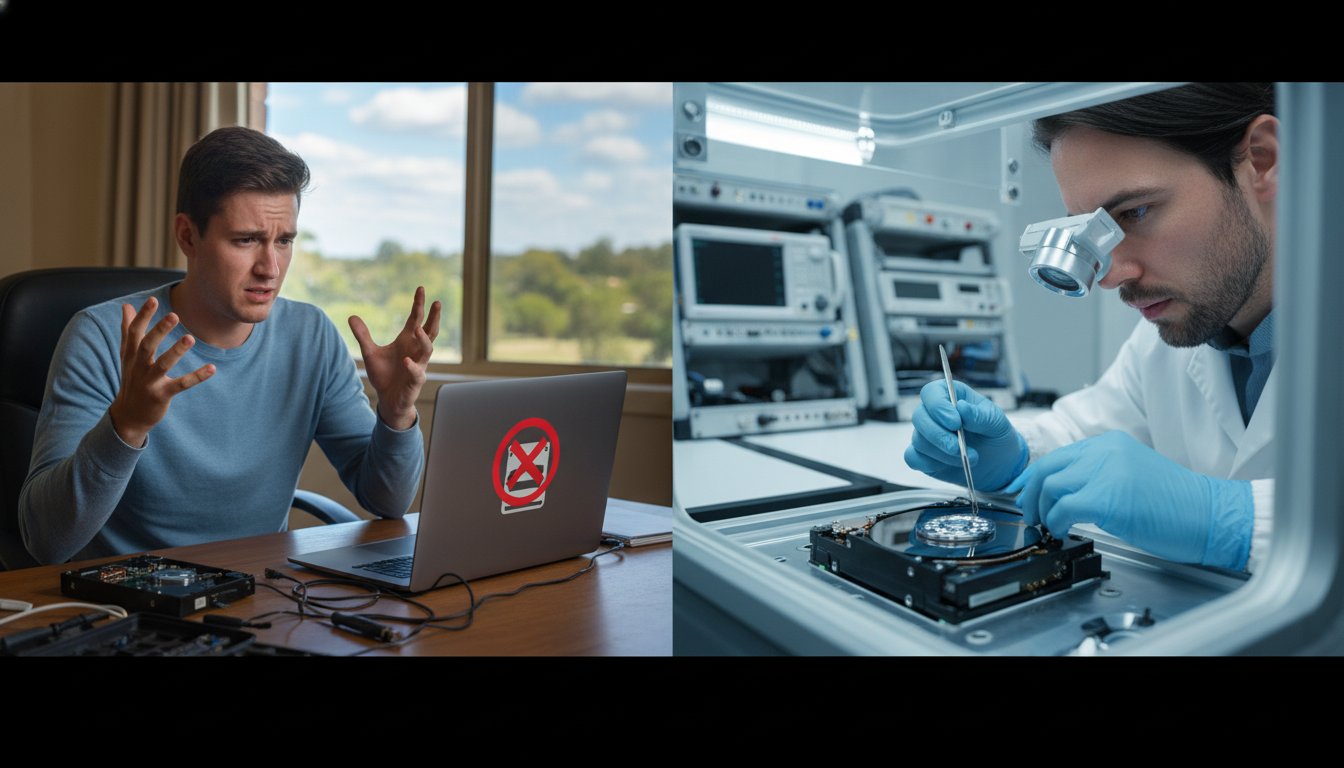
Imagine you just plugged in your external drive to find last year’s tax records, but instead of your files, you hear a rhythmic clicking sound. It is a gut-wrenching moment that 46% of computer users experience at least once a year according to 2023 industry reports. You might be tempted to download the first tool you find online, but the choice between data recovery software vs professional service isn’t always about price. We understand the panic that sets in when irreplaceable family photos or vital business documents seem to vanish. It’s natural to want a quick fix, but sometimes a cheap software download can turn a recoverable issue into a permanent data loss.
This article provides a clear “stop/go” framework to help you decide when to trust DIY methods and when calling a professional is the only way to save your files. We’ll explain the true cost of a failed recovery attempt and how to identify physical drive failure before you cause more damage. At Aspire Computing, we’ve supported the Toowoomba community since 1999, so we know exactly how to protect your digital life. We will walk you through the technical risks so you can make an informed decision and get back to work with confidence.
Key Takeaways
- Understand the critical difference between logical errors and physical drive failure to avoid the “broken leg” mistake of running software on a damaged disk.
- Learn to identify the specific scenarios where a budget-friendly DIY tool is a safe bet, helping you settle the debate of data recovery software vs professional service before risking your data.
- Discover why the repeated “stress tests” performed by recovery software can cause permanent mechanical damage to a clicking or beeping hard drive.
- Explore what happens inside a professional Class 100 Cleanroom and why specialised equipment is often the only way to retrieve data from a physically failed device.
- Get peace of mind with a local expert diagnostic in Toowoomba to ensure you don’t risk your precious memories or business data with the wrong recovery method.
The Data Recovery Dilemma: Logical vs. Physical Failure
Losing years of family photos or critical business spreadsheets feels like a punch to the stomach. Your first instinct is likely to search for a quick fix online, but your next move determines if those files are gone forever. At Aspire Computing, we’ve helped Australians since 1999 recover from these exact moments. The most vital rule is simple: don’t panic. Panic leads to impulsive DIY attempts that often turn a recoverable situation into a permanent loss. Deciding between data recovery software vs professional service depends entirely on how your drive failed.
To choose the right path, you must understand the two main types of data recovery: logical and physical. Logical failure happens when the drive’s hardware is healthy, but the software or file structure is corrupted. Physical failure means the internal components, like the read/write heads or the motor, have actually broken down. Using software on a physically damaged drive is like running a marathon on a fractured leg. The more you “run” the drive by keeping it powered on, the more the internal parts grind against each other, destroying the data surfaces.
To better understand this concept, watch this helpful video:
Roughly 20% of data loss cases involve physical damage that requires a controlled cleanroom environment. If you suspect hardware damage, software won’t help; it will only make things worse. In Australia, professional lab recovery for mechanical failures can range from A$500 to over A$3,000 depending on the complexity. However, if the issue is purely logical, you might save money by using a data recovery software vs professional service approach. Use the checklists below to self-diagnose your device’s health before you take action.
Signs of Logical Data Loss (Software-Safe)
- You accidentally deleted files or emptied the Recycle Bin on your PC.
- A drive was formatted by mistake, but it still sounds smooth and quiet when plugged in.
- The file system shows as “RAW” in Windows, yet the drive is still detected at its full correct capacity.
- The drive is visible in Disk Management and doesn’t cause your computer to freeze or lag.
Warning Signs of Physical Drive Failure (Danger Zone)
- The drive makes audible cues like clicking, rhythmic beeping, or a high-pitched grinding sound.
- Your computer stops responding or slows down to a crawl the moment the drive is connected.
- The device is not detected in the BIOS or Disk Management at all.
- You see frequent “I/O Device Error” messages, which often indicate the hardware is struggling to read basic sectors.
When Data Recovery Software is a Safe and Effective Choice
If you’ve accidentally hit delete on a precious folder, don’t panic. For many logical errors, a DIY approach is quite effective. You can typically find reputable software for between A$75 and A$150. This is often the first crossroad in the data recovery software vs professional service debate. Tools like Recuva or the open-source PhotoRec work by scanning the drive for file headers that the operating system has marked as empty space.
The most vital rule is to never install software on the drive you’re trying to save. Doing so can overwrite the very data you want back. Instead, use a secondary drive or a “Live USB” to run the data recovery process safely. This keeps the original drive in a read-only state, which is the only way to ensure you don’t cause further damage. If you’re unsure about the health of your hardware, it’s always safer to talk to the experts at Aspire Computing before proceeding.
The Best Use Cases for DIY Software
Software is a great choice for healthy hardware. If you’ve accidentally formatted a 64GB SD card from your camera or deleted a Word doc from a functioning HDD, DIY tools usually succeed. These programs are designed to rebuild minor partition table corruption on secondary storage. Since 1999, we’ve seen these tools save thousands of family photos that seemed lost forever. It’s an excellent first step for non-mechanical issues on external media.
The SSD Exception: Understanding TRIM
Modern Solid State Drives (SSDs) are different. They use a command called TRIM, which was introduced around 2010 to maintain drive speed. When you delete a file on an SSD, TRIM tells the controller to immediately wipe those data blocks. This makes data recovery software vs professional service a simpler choice; software rarely works for deleted files on modern laptops. Professional intervention is usually the only way to bypass these hardware-level commands, though even then, the window of opportunity is small. If your SSD has failed or files were deleted, stop using the device immediately to prevent the TRIM command from completing its cycle.
The Fatal Mistake: Why Software Can Destroy a Failing Drive
When your computer stops booting or your external drive starts clicking, the temptation to download a quick fix is high. However, running DIY software on a physically failing hard drive is the most common reason for permanent data loss. Inside a traditional hard drive, platters spin at speeds up to 7,200 RPM while read/write heads hover nanometres above the surface. If a component is failing, the drive’s mechanical balance is compromised. Software works by scanning every single sector on the disk to find lost files. This acts as an unintended stress test, forcing a crippled drive to work at maximum capacity for hours on end.
This intense activity often leads to a “Head Crash,” where the read head makes physical contact with the spinning platter. This doesn’t just delete files; it physically scrapes the magnetic coating off the disk. When evaluating software vs. service, the biggest risk is that a simple A$300 recovery can quickly escalate into a A$3,000 clean-room disaster if the media is physically shredded. At Aspire Computing, we’ve seen many cases where “just trying it once” with a home utility turned a recoverable drive into a paperweight.
The Danger of Continued Power-On
Every second a failing drive spins, it edges closer to total failure. One of the biggest threats to your data is actually Windows “Automatic Repair.” This utility is designed to fix software errors by writing new data to the drive, which can overwrite your deleted files or cause a mechanical breakdown. Media damage is the permanent removal of the magnetic layer from a platter.
Why Free Software Often Lacks Safety Features
Most consumer-grade software is designed for healthy drives with simple file system errors. These tools are often aggressive and try to “repair” the directory structure. In contrast, professional tools are strictly “read-only” to ensure no data is altered. Using the wrong tool for data recovery software vs professional service decisions can lead to the software overwriting the very blocks of data you need to save. Professional technicians always follow a strict protocol:
- Immediate power-down of the affected device to prevent further wear.
- Creating a bit-by-bit “clone” of the drive using specialised hardware-level imagers.
- Performing all recovery attempts on the clone, never the original failing hardware.
Since Chaim Lee founded Aspire Computing in 1999, we’ve prioritised these safety steps to protect our clients’ digital lives. Don’t risk a permanent crash by running unverified software on a drive that’s making unusual noises. It’s always safer to talk to the experts first.
Professional Data Recovery Services: What Happens Behind the Lab Door
If you’ve looked at the price of expert help, you might have felt a moment of sticker shock. It’s common to wonder why a specialist quote is higher than a software subscription. The reality is that professional labs operate more like surgical theatres than IT offices. When we weigh the choice of data recovery software vs professional service, we’re looking at the difference between a basic DIY fix and a high-tech intervention. Professional recovery involves expensive infrastructure and decades of engineering expertise that software simply cannot replicate.
The core of a professional lab is the Class 100 Cleanroom. These environments are strictly controlled to ensure fewer than 100 particles of dust per cubic foot of air. This is vital because a modern hard drive platter spins at 7,200 RPM, with the read/write head hovering just nanometres above the surface. A single microscopic speck of dust, which is about 0.5 microns in size, acts like a boulder on a highway. If dust enters a drive opened in a normal room, it will cause a “head crash,” destroying your data forever. Labs provide the only safe environment for these delicate physical repairs.
Firmware and Component Repair
Many “dead” drives don’t actually have broken parts; they have corrupted internal software called firmware. This is the drive’s own operating system that tells it how to function. When firmware fails, your PC won’t even recognise the device is plugged in. No retail software can reach this level of the hardware. Engineers use specialized hardware imagers to bypass these errors and communicate directly with the drive’s microcode.
If the failure is mechanical, engineers perform a “head swap.” This requires sourcing an identical “donor drive” from the same manufacturing batch to ensure the parts match perfectly. They then transplant the healthy heads into your damaged drive with extreme precision. These labs also use advanced imagers that can skip over bad sectors, saving the healthy data before the drive fails completely. It’s a methodical process designed to get your files back without causing further stress to the hardware.
Security and Confidentiality
For Australian businesses handling sensitive medical records or financial data, security is a non-negotiable factor. Sending a drive to a professional lab ensures a clear chain of custody and high-level encryption protocols. Most reputable specialists also offer a “No Data, No Fee” guarantee. This means you don’t pay the full recovery fee unless they successfully retrieve your critical files, which provides peace of mind during a stressful situation.
Deciding if the investment is worth it often comes down to the value of what’s lost. For a business, the cost of several days of downtime can far exceed the A$800 to A$2,000 typically spent on recovery. For families, the sentimental value of ten years of photos is often priceless. If your data is irreplaceable, skipping the DIY attempts and going straight to a lab is the safest path to success. You can learn more about the technical steps involved by visiting our Data Recovery Services page.
Don’t risk your precious memories or business files with trial and error. Talk to the experts at Aspire Computing for a professional assessment of your drive.
Choosing the Right Path in Toowoomba: How Aspire Computing Helps
When you realise your files are missing, your first instinct might be to download a random tool or ship your drive to a lab in Sydney or Brisbane. For residents across Toowoomba and the Darling Downs, there is a better way. Aspire Computing provides a local, honest first-look diagnostic that cuts through the confusion of data recovery software vs professional service. Chaim Lee brings technical expertise directly to your door, whether you are in Highfields, Westbrook, or the Toowoomba CBD. We come to you, so you don’t have to worry about your sensitive hardware getting lost in the mail.
Our approach is built on personal accountability. Since 1999, Chaim has helped locals recover from digital disasters with a calm, professional manner that takes the panic out of the situation. We don’t just look at the drive; we look at the whole picture. Sometimes the solution is a simple fix that doesn’t require expensive, invasive procedures. By choosing a local expert, you get a face-to-face explanation of what went wrong and a clear path to getting your data back safely.
Local Diagnostic vs. Expensive Mail-In Labs
Large national labs often charge hundreds of dollars just for an initial assessment, and that is before you pay for shipping. Often, the issue isn’t a catastrophic internal failure but a faulty power cable or a failed external enclosure. Our “Don’t Panic” assessment identifies these external hardware failures immediately. If your PC is acting up, a Computer Repairs Toowoomba check-up can often resolve the issue for a fraction of the cost of a lab recovery. We determine the exact failure type before you spend a single cent on software that might not even work for your specific problem.
- Avoid high shipping costs and the risk of transit damage.
- Identify simple hardware faults like faulty ports or cables.
- Receive a transparent quote based on Australian market rates.
- Get an honest opinion on whether data recovery software vs professional service is the right move for your budget.
Preventing Future Data Loss
Recovery is a last resort; active protection is the real goal. We help Toowoomba small businesses and home offices implement the 3-2-1 backup rule. This means keeping three copies of your data, on two different media types, with one copy stored securely off-site. Moving from aging mechanical hard drives to modern Hardware Upgrades like Solid State Drives (SSDs) also significantly reduces the risk of physical failure. Our “Protect and Connect” philosophy ensures your system is resilient, fast, and always backed up so this nightmare never happens again.
Don’t let a hardware failure ruin your week or your business continuity. Contact Chaim at Aspire Computing today for a professional data assessment and get your digital life back on track with a local expert you can trust.
Secure Your Files With a Toowoomba Expert
Losing your photos or business documents is stressful, but you don’t have to navigate the data recovery software vs professional service debate alone. If your hard drive is making clicking sounds or has suffered a physical drop, stop what you’re doing immediately. Running DIY software on a failing drive often causes permanent data loss by putting too much strain on damaged components. Since 1999, Aspire Computing has provided the reassurance and technical skill needed to rescue lost data for the local community.
Chaim Lee offers a personal touch that big corporate labs can’t match, providing on-site support throughout Toowoomba and surrounding suburbs. We’ve spent over 24 years refining our recovery processes to ensure your hardware receives the highest level of care. Choosing a professional path isn’t just about technical tools; it’s about the peace of mind that comes from experienced local hands. Don’t risk your digital life on a guess when expert help is right around the corner.
Talk to the experts at Aspire Computing for a professional data assessment
Your data is important, and we’re here to help you get it back safely.
Frequently Asked Questions
Is it safe to use free data recovery software?
Free data recovery software is safe only if your storage device is physically healthy and you’re recovering a few accidentally deleted files. If your drive makes unusual noises or freezes your computer, using software can cause permanent data loss by forcing the failing hardware to work harder. You should always install the software on a separate drive to avoid overwriting the very data you’re trying to save.
How much does professional data recovery cost in Australia?
Professional data recovery in Australia typically ranges from A$300 for basic logical fixes to over A$3,000 for complex mechanical repairs. These figures reflect 2023 industry price standards for laboratory work across Queensland and New South Wales. The final price depends on whether your drive needs a cleanroom environment or specific donor parts to function during the extraction process.
Can I recover files from a clicking hard drive using software?
You cannot recover files from a clicking hard drive using software because the sound indicates a physical mechanical failure. A clicking noise usually means the read/write heads are failing or making contact with the platters. Running software on a clicking drive often leads to a total “head crash,” which makes your data unrecoverable even for specialists with advanced equipment.
Why is my SSD not showing up after I deleted a file?
Your SSD might not show up because of the TRIM command, which is a feature found in roughly 95 percent of modern solid state drives. When you delete a file, TRIM tells the SSD to wipe those data blocks immediately to maintain high performance. This background process can sometimes cause the drive controller to stop responding or make the deleted partition appear invisible to your operating system.
What should I do immediately after I realise my data is missing?
Stop using the device immediately and power it down to prevent the system from overwriting your lost files. Every minute the computer stays on, it writes background logs and temporary files that can destroy your data forever. Understanding the risks of data recovery software vs professional service is vital here, as continuing to use the drive reduces your recovery success rate to below 15 percent.
How long does professional data recovery usually take?
Most professional data recovery cases take between 2 and 10 business days to complete from start to finish. Simple logical recoveries are often finished within 48 hours, while complex mechanical failures requiring donor parts from interstate can take longer. At Aspire Computing, we focus on a fast return to ensure your digital life or business continuity isn’t disrupted for more than a week.
Can data be recovered from a physically smashed laptop or external drive?
Yes, data can often be recovered from physically smashed devices using advanced cleanroom techniques or chip-off recovery. Even if the outer casing is destroyed, the internal platters or NAND flash memory chips usually remain intact. Experts can transplant these components into a donor chassis or use specialized readers to extract your files safely from the damaged hardware.
Does Aspire Computing offer a “No Data, No Fee” policy?
Aspire Computing provides a transparent assessment and we’ll discuss our “No Data, No Fee” policy options with you before we begin any recovery work. This approach ensures you don’t face unexpected laboratory costs if your files are determined to be completely unrecoverable. Chaim Lee has helped the Toowoomba community with honest tech support since 1999, so we prioritize your peace of mind throughout the process.

B.App.Sc., Cert. Computer Engineering PC Service and Repair
As the owner of Aspire Computing founded in 1999, Chaim Lee has been working for over 20 years as the Leading Computer Technician.
He has a life long interest in electronics, computing, science and technology. He has completed studies and gained qualifications in Applied Science, Computer Repair and Service, Microsoft Installation and Maintenance, Technical Writing, Workplace Training, and Technical Sales Training.
