
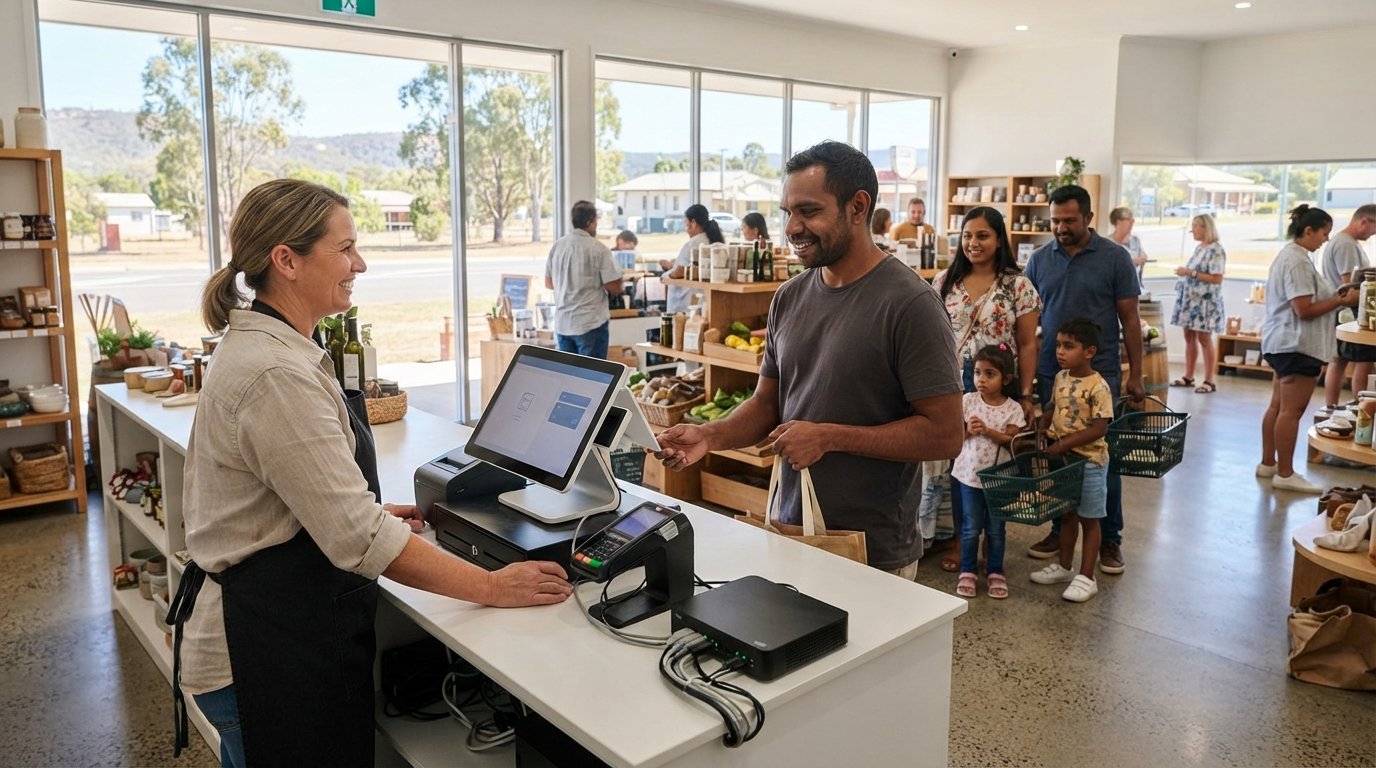
Imagine it’s a bustling Saturday morning in Gatton and your shop is full of customers, but suddenly your POS system freezes and the queue starts walking out the door. You don’t have days to wait for a technician to travel from Brisbane, and you certainly can’t afford the lost revenue of a silent cash drawer. Reliable tech support for retail stores Lockyer Valley is about more than just fixing a computer; it’s about protecting your daily trade from the unique challenges of regional connectivity and hardware fatigue.
We understand that as a local business owner, your priority is a seamless customer experience without the constant fear of data breaches or NBN dropouts. You deserve a partner who understands the local landscape and responds with the urgency your business demands. This article explores how specialized local IT support can eliminate retail downtime and secure your Lockyer Valley business heading into 2026. We will look at streamlining your payment systems, securing customer data, and ensuring you have a single, dependable point of contact for every technical hurdle you face.
Key Takeaways
- Learn why specialized tech support for retail stores Lockyer Valley is essential for overcoming regional connectivity issues in towns like Gatton and Laidley.
- Discover how to maintain your POS terminals and EFTPOS systems to ensure the checkout line never stops moving during peak trading hours.
- Understand the difference between reactive ‘break-fix’ repairs and proactive monitoring to prevent technical failures before they impact your revenue.
- Identify the critical steps for daily sales data backups and cybersecurity measures that protect your customer information and ensure business continuity.
- Get a practical retail tech health checklist covering everything from hardware ventilation to cable management in small shopfront spaces.
Why Local Retailers in the Lockyer Valley Need Specialised Tech Support
Retail tech support is much more than just fixing a computer that won’t turn on. For a shop in Gatton or Laidley, it’s the vital backbone of every transaction. Specialized tech support for retail stores Lockyer Valley involves managing the delicate balance between point of sale systems, secure payment gateways, and regional networking. When these components fail, the business simply stops.
Think about a busy Saturday morning rush. If your EFTPOS goes down or your receipt printer jams, you lose more than just that sale. You lose customer trust. For local retailers, a single hour of downtime can cost hundreds or even thousands of dollars in revenue. This is why generic IT support often isn’t enough. You need someone who understands the specific hardware and software that keeps a shopfront running smoothly.
Regional Connectivity and the Lockyer Valley Retailer
Retailers in Plainland and surrounding areas often struggle with NBN stability. Regional connections can be less reliable than those in major cities, making 4G or 5G failover solutions a non-negotiable requirement for modern shops. If your primary internet drops out, your POS should switch to a backup connection instantly so you don’t miss a beat. Local weather patterns also play a role. High humidity and sudden storms in the Valley can lead to hardware fatigue or power surge damage. A local expert knows how to protect your equipment against these specific environmental factors through robust surge protection and proper ventilation.
The ‘Local Expert’ Advantage
Many corporate IT firms are based in Brisbane. If your server crashes at 9:00 AM, waiting two hours for a technician to drive up the range isn’t a viable option. Choosing a local partner like Aspire Computing means significantly faster on-site response times. We’ve been serving the region since 1999, so we understand the local business community and the high expectations of your customers.
There’s also the matter of personal accountability. When you call for help, you aren’t reaching a distant call centre or a rotating queue of junior staff. You’re talking to Brian, someone who values the reputation of your business as much as his own. This direct line of communication ensures your issues are resolved quickly and correctly the first time, giving you the peace of mind to focus on your customers rather than your cables.
Essential IT Services for Modern Retail: POS, Connectivity, and Security
Modern retail is a digital environment. Every time a customer taps their card, a complex chain of hardware and software works together to complete the transaction. If one link fails, your business halts. High-quality tech support for retail stores Lockyer Valley ensures that your POS system, payment gateways, and network are always synchronized. It isn’t just about making things work; it’s about ensuring they work securely and efficiently. If you are exploring how these systems connect with broader security infrastructure, the integration guide from Peninsula Smart Care provides excellent insights into modern commercial standards.
One often overlooked aspect of retail tech is network segmentation. Your business data, like inventory and financial records, should never share the same Wi-Fi channel as your customers. Setting up a dedicated guest network keeps your internal systems isolated and protected from accidental or intentional interference. This separation is also vital for EFTPOS compliance, ensuring your payment gateway remains secure and meets Australian banking standards.
Retail environments are tough on gear. Dust, heat, and constant use can degrade specialized hardware faster than a standard office computer. We provide expert printer supply and repair for receipt and thermal printers to ensure your checkout process remains professional and fast. Reliability is the cornerstone of effective tech support for retail stores Lockyer Valley. Often, an older POS terminal doesn’t need to be replaced entirely. A targeted hardware upgrade, such as an SSD installation or a memory boost, can breathe new life into existing equipment and save you the cost of a full system overhaul.
Cybersecurity and Data Protection
Retailers are prime targets for cybercriminals because they handle sensitive customer data. Implementing strict virus and malware removal protocols is your first line of defense. However, protection goes beyond just cleaning infected files. You need automated, off-site backups for your inventory databases. If a ransomware attack strikes, having a clean copy of your data stored safely away from your local network means you can recover without paying a cent to criminals.
Protecting your business records and customer credit card data is a continuous process of monitoring and maintenance. If you’re concerned about your current setup, a quick tech health check can identify vulnerabilities before they become expensive problems. Being proactive today prevents a crisis tomorrow.
Choosing the Right Tech Support Model: Break-Fix vs. Proactive Monitoring
Every shop has different needs. A small boutique in Forest Hill operates differently than a large hardware store in Gatton. Finding the right tech support for retail stores Lockyer Valley means choosing a model that fits your budget and your risk tolerance. There isn’t a one size fits all solution, especially in a regional market where business volume can shift with the seasons.
The “Break-Fix” model is straightforward. When something breaks, you call for help and pay for the repair. It’s an on-demand service that works well for micro-retailers who have minimal technical overhead. However, for busier shops, the “Managed IT” approach is often more cost-effective. This model focuses on prevention, stopping technical glitches before they interrupt a sale. For Lockyer Valley small businesses, the choice often comes down to a simple question: how much does an hour of downtime actually cost your bottom line?
When to Call for On-Demand Support
Sometimes, unexpected hardware issues occur. A staff member might drop a laptop, or a sudden power surge might fry a terminal’s power supply. These are the moments when on-demand assistance is vital. We also offer immediate data recovery services if a system crash puts your inventory or financial records at risk. On-demand support is also perfect for one-off projects, such as migrating your shop computers to Windows 11 or setting up a new printer in the back office.
The Case for Proactive Maintenance
For retailers who can’t afford a single minute of downtime, proactive IT support for business is the better path. We perform regular system tune-ups to ensure your POS terminals don’t slow down during peak trading periods like the Christmas rush. It’s about strategic planning rather than crisis management. By monitoring your hardware health continuously, we can spot a failing hard drive on a quiet Tuesday morning. This allows us to replace it before it causes a total system failure on a busy Saturday. This level of consistency is especially important for seasonal retail businesses that need their tech to be 100% reliable when the local tourist or harvest traffic peaks.

A Retailer’s Tech Health Checklist: Preventing Downtime Before It Starts
Prevention is always more affordable than a crisis. While having reliable tech support for retail stores Lockyer Valley is essential, many common issues can be avoided with a simple, consistent maintenance routine. By taking a few minutes each day to verify your systems, you protect your revenue and reduce the stress of unexpected failures. It’s about building a resilient environment where your technology works for you, not against you.
Your first priority should be daily backup verification. Never assume your sales data is safe just because the system is running. Check your backup logs every morning to ensure your inventory and financial records were successfully saved off-site overnight. Additionally, be strict with your software update schedules. Never hit “update” during trading hours; a simple reboot can sometimes lead to unexpected configuration errors that could sideline your POS for hours.
Staff training is your strongest defense against cyber threats. Phishing emails often target retail counters, appearing as fake invoices or shipping notifications. Ensure your team knows never to click links or download attachments on a terminal that handles customer payments. A quick ten-minute briefing on digital safety can save your business from a devastating data breach.
Physical Hardware Care
Retail spaces are often cramped, which leads to overheating and cable strain. Maintaining physical hardware is a core part of effective tech support for retail stores Lockyer Valley. Ensure your POS terminals and servers have adequate ventilation; dust buildup in a tight counter space is a primary cause of hardware failure. Regularly clean your thermal printers and barcode scanners with approved supplies to prevent jams and read errors. As we head into the Australian storm season, test your Uninterruptible Power Supply (UPS) units. These devices provide a critical buffer during power flickers, giving you enough time to shut down systems safely without corrupting your database. Check for worn or frayed cables monthly, as these are often the culprit behind intermittent connection drops.
Digital Security Hygiene
Digital safety requires regular audits to remain effective. Review user access to your POS and accounting software at least once a quarter. If a staff member has left the business, their access should be revoked immediately. Ensure your antivirus software is updating automatically on every networked device and verify that your firewall is active. A correctly configured firewall acts as a silent sentry, blocking unauthorized traffic before it reaches your sensitive data. If your current setup feels overwhelming, we can help you implement these standards. You can book a comprehensive tech health check to identify and fix vulnerabilities before they impact your trade.
Aspire Computing: Your Trusted Local Partner for Retail IT in the Lockyer Valley
Since 1999, Aspire Computing has provided dedicated on-site and remote IT assistance to the small business community. We’ve spent over 25 years understanding the specific technical needs of shopfronts across the Toowoomba and Lockyer Valley regions. While technology has changed significantly since we started, our commitment to providing reliable tech support for retail stores Lockyer Valley has remained constant. We don’t just fix computers; we help local retailers build stable, secure foundations for their businesses.
Choosing an owner-operator business means you receive a level of personal accountability that corporate firms simply can’t match. When you work with us, you’re dealing directly with Brian. This personal touch ensures that your technical history isn’t lost in a ticketing system. We understand that retail budgets are often tight, so we focus on practical, high-impact solutions that provide the best return on investment. Whether you need a simple hardware repair or a complete business continuity plan, we tailor our services to keep your shop running without unnecessary overhead.
Why Lockyer Valley Businesses Choose Brian
Experience matters in the fast-paced retail environment. With a track record of professional service stretching back to the late nineties, we’ve seen every type of system failure and connectivity hurdle imaginable. We provide no-nonsense technical advice that focuses on your bottom line. We won’t suggest expensive upgrades if a simple tune-up will do the job. This honesty has built long-term trust with shop owners from Gatton to Laidley. We understand the unique needs of regional QLD shops, including the challenges of local infrastructure and the importance of being ready for the busy harvest or tourist seasons. You get expert knowledge combined with local, neighborly service.
Getting Started with a Tech Audit
The best way to prevent a technical crisis is to understand your current vulnerabilities. Booking an on-site visit is the first step toward a more stable retail environment. During your first consultation, we’ll perform a thorough review of your POS terminals, network security, and backup protocols. We look for the “silent killers” of retail tech, such as poor ventilation, outdated software, or unverified data backups. We’ll provide you with a clear, prioritized list of recommendations to improve your uptime and security. It’s a straightforward process designed to give you peace of mind. Contact Aspire Computing today for reliable retail tech support and ensure your business is protected for 2026 and beyond.
Secure Your Store’s Future in the Lockyer Valley
Your retail business shouldn’t be held back by unreliable internet or aging POS systems. We’ve explored how proactive maintenance and rapid on-site response can transform your shop’s stability. By focusing on essential hardware care and robust cybersecurity, you protect your revenue and your customers’ trust. Reliable tech support for retail stores Lockyer Valley is the key to ensuring your doors stay open and your checkout lines keep moving through every busy season.
Since 1999, Aspire Computing has provided specialized on-site support for the Lockyer Valley and Toowoomba. We bring deep expertise in both hardware repairs and modern cybersecurity to every local shopfront we serve. Don’t wait for a system failure to impact your bottom line. Take control of your technology today by scheduling a professional review of your current setup. Book Your Local Retail Tech Audit with Aspire Computing and gain the peace of mind that comes with having a local expert on your side. Your business is a vital part of our community, and we’re here to help it thrive.
Frequently Asked Questions
What should I do if my POS system crashes on a Saturday morning?
Contact us immediately for assistance. A Saturday crash is a retail emergency that requires a fast response to prevent lost sales. Before calling, try a basic power cycle of the terminal and check all cable connections to the receipt printer and EFTPOS machine. We specialize in rapid tech support for retail stores Lockyer Valley to get your checkout line moving again as quickly as possible. Having a local expert on standby reduces the stress of these critical failures.
Do you provide on-site tech support in Gatton and Laidley?
Yes, we provide comprehensive on-site support throughout Gatton, Laidley, Plainland, and the surrounding Lockyer Valley region. Being based in nearby Toowoomba allows us to reach your storefront quickly when physical hardware repairs or networking setup are required. We’ve been serving local businesses since 1999, ensuring that regional retailers have access to the same high-quality technical expertise as those in major metropolitan cities. We understand the unique challenges of regional business infrastructure.
How can I improve the internet speed in my Lockyer Valley store?
We start by auditing your current NBN connection and router configuration to identify bottlenecks. Regional speeds often suffer from poor Wi-Fi coverage or outdated hardware. We can install high-gain antennas, optimize your network settings, or implement a 4G/5G failover system. This ensures your EFTPOS and cloud-based inventory systems remain fast and responsive even during peak periods or when the primary NBN connection is unstable. Reliability is just as important as raw speed for retail.
Is my retail store too small for professional IT support?
No business is too small to benefit from professional technical assistance. Even a single-terminal shopfront relies on technology to process payments and track stock. We offer flexible support models, including on-demand repairs for micro-retailers who don’t need a monthly contract. Investing in professional tech support for retail stores Lockyer Valley helps you avoid the high costs of extended downtime and protects your sensitive customer data from emerging cyber threats. We scale our services to fit your needs.
Can you help me set up a secure Wi-Fi network for my customers?
We can configure a dedicated guest Wi-Fi network that is completely isolated from your business data. Providing free internet is a great way to attract customers, but it must be done safely. We ensure that your POS system, inventory database, and private business files are hidden behind a secure firewall. This prevents unauthorized users from accessing your internal network while still offering a convenient service to your shop’s visitors. Security and utility can coexist perfectly.
What happens if I lose my inventory data in a system crash?
We offer specialized data recovery services to help you retrieve lost files from crashed hard drives or corrupted databases. If your inventory or financial records disappear, it’s vital to stop using the device immediately to prevent data overwriting. While we have a high success rate with recovery, we also help you implement automated data backup solutions. This ensures you have a secure, off-site copy of your information for future business continuity and peace of mind.
How often should I have my retail hardware serviced?
We recommend a professional hardware service at least every six months. Retail environments are often dusty, which can lead to overheating and component failure in POS terminals and servers. Regular maintenance includes cleaning internal fans, testing power supplies, and performing software tune-ups. For busy shops, a quarterly checkup is even better. This proactive approach identifies failing parts before they cause an expensive mid-week shutdown during your busiest trading hours. It’s an investment in your shop’s uptime.
Do you offer remote support if I don’t need a technician on-site?
Yes, we provide efficient remote IT support for issues that don’t involve physical hardware damage. Using secure software, we can log into your system to troubleshoot software glitches, perform Windows updates, or remove malware. This is often the fastest way to resolve minor technical hurdles without waiting for a technician to drive to your location. If the problem requires a hands-on fix, we can then transition to an on-site visit. It’s about getting you back to work quickly.

B.App.Sc., Cert. Computer Engineering PC Service and Repair
As the owner of Aspire Computing founded in 1999, Chaim Lee has been working for over 20 years as the Leading Computer Technician.
He has a life long interest in electronics, computing, science and technology. He has completed studies and gained qualifications in Applied Science, Computer Repair and Service, Microsoft Installation and Maintenance, Technical Writing, Workplace Training, and Technical Sales Training.